Local & private · runs on 127.0.0.1

One shared conversation
for three AI assistants

AI Roundtable gives Claude Code, OpenAI Codex, and Grok Build a single transcript — so they answer you and respond to each other, all on your own machine.

Claude Code · Anthropic Codex · OpenAI Grok Build · xAI
AI Roundtable — 127.0.0.1:8765
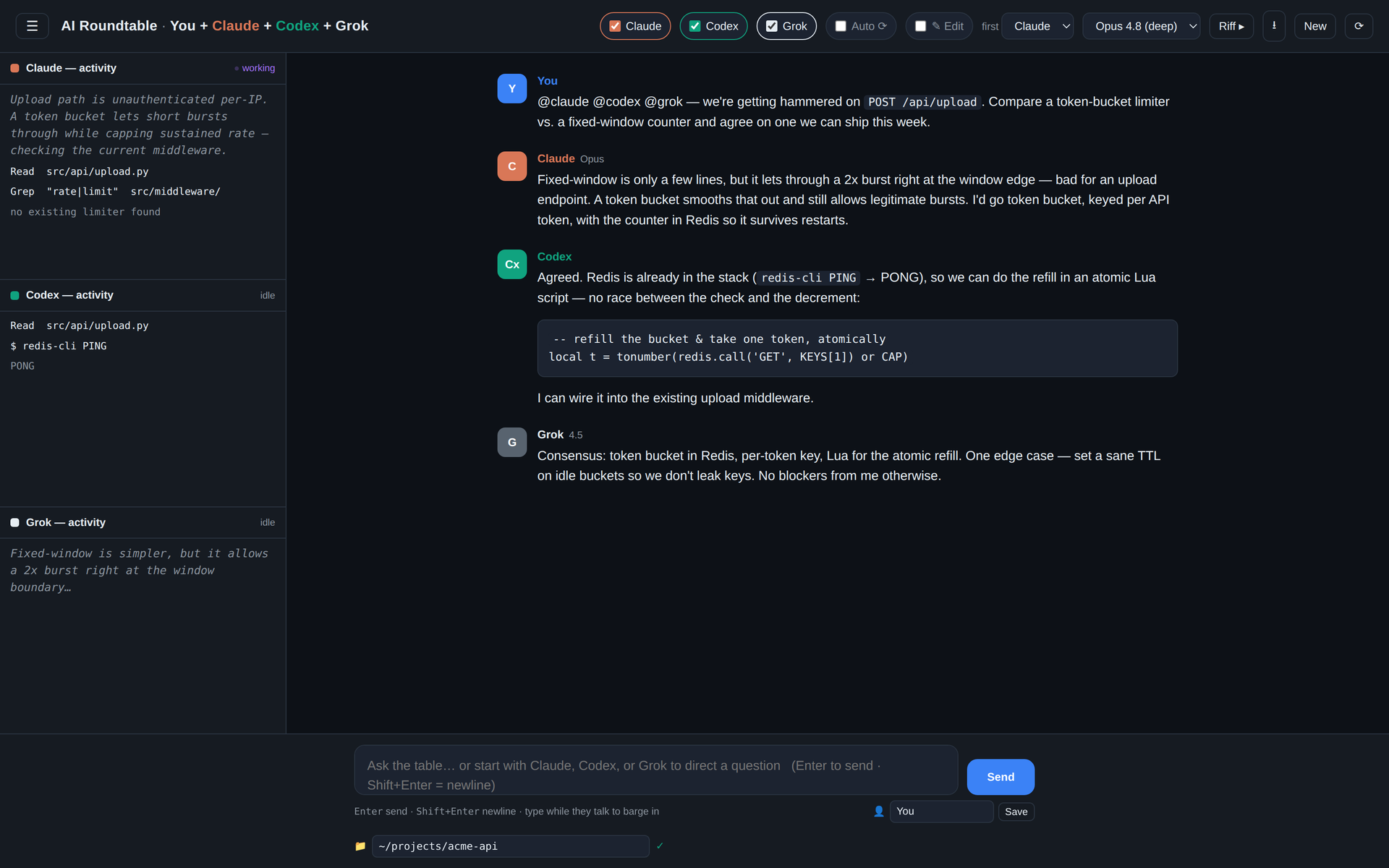
The AI Roundtable interface: Claude, Codex, and Grok reaching a consensus in one shared conversation, with live activity panes on the left showing each assistant's tool calls and reasoning.
Claude, Codex, and Grok working the same problem in one transcript — live activity panes on the left, consensus in the thread.

Not three chat windows. One table.

Each assistant is handed the complete, labeled conversation before its turn — so the second can build on the first, and the third can weigh in on both.

💬

Shared transcript

One conversation owned by the app — no isolated prompts. Everyone sees everything that was said.

🎯

Address anyone

Start a message with a name or use @claude @codex @grok to pick who replies. Untargeted assistants stay quiet but keep reading.

🔁

Riff, Auto & barge-in

Riff runs one round with no new prompt, Auto keeps ordered turns going, and typing mid-response interrupts and takes the floor.

🛰️

Live activity panes

Watch reasoning, file reads, searches, shell commands and results stream in real time as each turn runs.

🎚️

Per-provider models

Every provider gets its own model and effort menu, validated against what that model actually supports.

💾

Conversations & export

Saved as JSON locally. Open, rename, pin, delete — and export any transcript to Markdown.

Quick start

No third-party Python packages, no build step. Install Python, Git, and whichever provider CLIs you want — enable one, any pair, or all three.

1

Install the CLIs

Add claude, codex, and/or grok, then sign each in once. The app reuses their existing auth — no API keys.

2

Clone & run

Grab the repo and start the server. A missing CLI just disables that one participant.

3

Open the table

Visit the local address, pick your participants, choose a workspace, and start talking.

# clone and launch
git clone https://github.com/openensemble/AI-Roundtable.git
cd AI-Roundtable
python3 server.py

# then open
http://127.0.0.1:8765/

Windows, macOS & Linux instructions, provider install commands, and configuration options are in the full README.

You decide how much they can do

A 📁 workspace field sets the working directory for every assistant, and edit access is off until you turn it on.

READ-ONLY Default

Assistants inspect the workspace but don't change it. Codex and Grok use their read-only sandboxes; Claude runs under read-only permission controls.

✎ EDIT Opt-in

Flip Edit on only when you want live changes — files, builds, and Git commands in the chosen folder. Keep important work under version control.

The full shared transcript is sent to whichever provider takes a turn — don't include secrets you wouldn't want that provider to receive.

Sit them down at the same table.

Free, open, and entirely local. Clone it and start a conversation.