AVB unlocked
Recorded lock-state change from locked to unlocked. The unlock persisted through a required factory reset and a later reboot.
Unlock evidenceORIGINAL 2024 MODEL · JARVIS / SNA
onn. 4K Pro unlock & root
A documented path to AVB unlock and permanent Magisk root for the earlier onn. 4K Pro. Built around exact firmware checks and results you can inspect.
Experimental · One tested unit · Linux host required
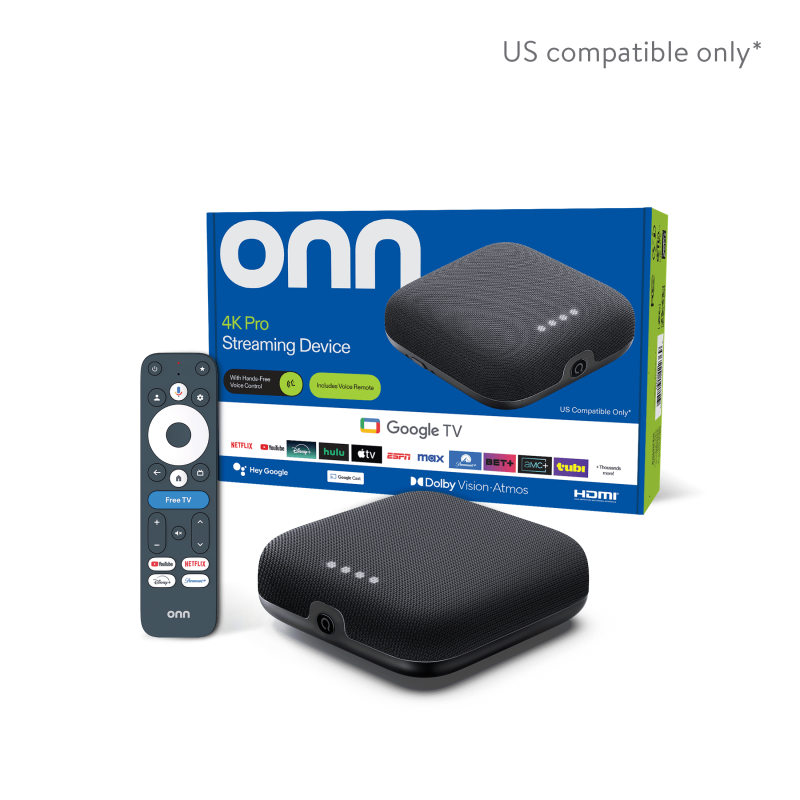
Earlier 2024 onn. 4K Pro only. The 2023 onn. 4K non-Pro and the new 2026 4K Pro are unsupported.
Know the difference01 / THE EVIDENCE
Recorded lock-state change from locked to unlocked. The unlock persisted through a required factory reset and a later reboot.
Unlock evidenceMagisk 30.7 root verified after a normal reboot, with the thumb drive physically removed and the Magisk environment checked.
Root evidence15051976 → 16202347 retained root, the existing unlock, apps and setup on the same one box. No reset. Fresh unlocking and first-time root on 16202347 remain untested.
Read the limitsOriginal unlock/root measured October 21; upgrade measured November 6, 2026. Software and test dates do not identify the hardware generation.
02 / CHECK YOUR BOX
The “4K Pro” name alone is not enough. This project covers the original 2024 jarvis / SNA model, with the separate workflow limits below.
Check every value before you begin. A match does not guarantee success on another unit. Do not bypass the checks or switch slots to make a device qualify.
How to check your firmwareUnsupported hardware2023 onn. 4K (non-Pro), new 2026 4K Pro, and all other models.
jarvis / SNAURO4.260304.011.B11505197601.01.260304.175641_b (slot B only)URO4 uses the letter O, not the number zero.
CHOOSE YOUR FIRMWARE WORKFLOW
16202347 is the newest reviewed firmware in this package. Unknown future releases are never selected automatically.
| Workflow | Starting point | What is verified |
|---|---|---|
| Original unlock and root | 15051976, locked, slot B | Unlock, required reset and persistent root verified on one device. |
| Update and keep root ↗ | Rooted/unlocked 15051976 B → 16202347 A | Upgrade tested and verified on one device. Apps, settings and root retained. Live status messages, backups and readback checks. |
| Experimental unlock + optional root ↗ | Already on 16202347, locked, existing slot A or B | NOT HARDWARE TESTED. Can erase data or permanently brick the device. Optional root is offered only after successful unlock verification, with a separate risk acknowledgment. Both fresh unlock and root are untested. |
Experimental unlock and root on 16202347 can permanently brick your device. Recovery is not guaranteed. You are solely responsible for choosing to take the risk and for all resulting loss, damage, costs or loss of use. The project authors do not take responsibility for resulting damage or data loss. A successful upgrade of an already-unlocked box does not prove that a fresh unlock or first-time root works.
03 / START WITH THE GUIDE
The terminal guide explains each stage, checks the device, and asks for a separate confirmation before each risky action.
Unlocking can erase your setup. Flashing can permanently brick your device. Back up your data and read the recovery and stopping conditions first. Recovery is not guaranteed.
Match the model, firmware, bootloader and starting state for your chosen workflow. The original unlock needs stock slot B; the upgrade needs the covered existing root.
A Linux x86_64 computer, Python 3.10+, network ADB access, normal device power, and enough backup space. Unlock experiments also require a USB drive with a FAT32 first partition.
The menu separates original unlock/root, the reviewed upgrade, and the untested new-firmware unlock. Read its dedicated instructions and risk notices first.
git clone https://github.com/openensemble/onn-4k-pro-unlock-root.git
cd onn-4k-pro-unlock-root
python3 onn.py04 / BEFORE YOU BEGIN
Know what this project covers before you change your device.
No. The 2023 onn. 4K non-Pro is a different device. This guide is for the original 2024 onn. 4K Pro (jarvis / SNA), pictured above. Use the supported model’s product listing and the firmware checks to identify your box.
No support is provided for the new 2026 hardware. It is untested. The 2026 security patches and test dates refer to software and testing on the earlier 2024 model.
Unlocking required a factory reset on the tested unit, erasing apps, accounts, and settings. The later upgrade to 16202347 preserved that setup and root. Fresh unlocking on 16202347 is untested; expect data loss and possible permanent bricking. Back up anything you need before starting.
Yes, on the single tested unit: root returned after a normal reboot with the thumb drive physically removed. The original measurements include the root identity, partition hashes, and Magisk environment checks. This does not establish repeatability on another unit or long-term reliability.
The specific rooted 15051976/B → 16202347/A upgrade was verified on one device. A separate fresh-unlock option for locked 16202347 on existing slot A or B is untested and can permanently brick the device; you take sole responsibility for that risk. Other builds remain unsupported. Do not downgrade, switch slots, or bypass checks to force compatibility.
The documented host is Linux x86_64; other host systems are untested. The boot image must be patched on your own target device, following the guide. Do not use another person’s patched image.
FOLLOW THE RESEARCH
Read the source, inspect the evidence, or report what you find.
If this work is useful, a star helps others find it.