Display dashboards
OpenEnsemble can turn a browser or wall tablet into a focused display without making you maintain a separate dashboard application. Each OE profile owns its own dashboard library, and every dashboard gets a stable address such as /dashboards/kitchen.
Get started with OpenEnsemble View the project on GitHub
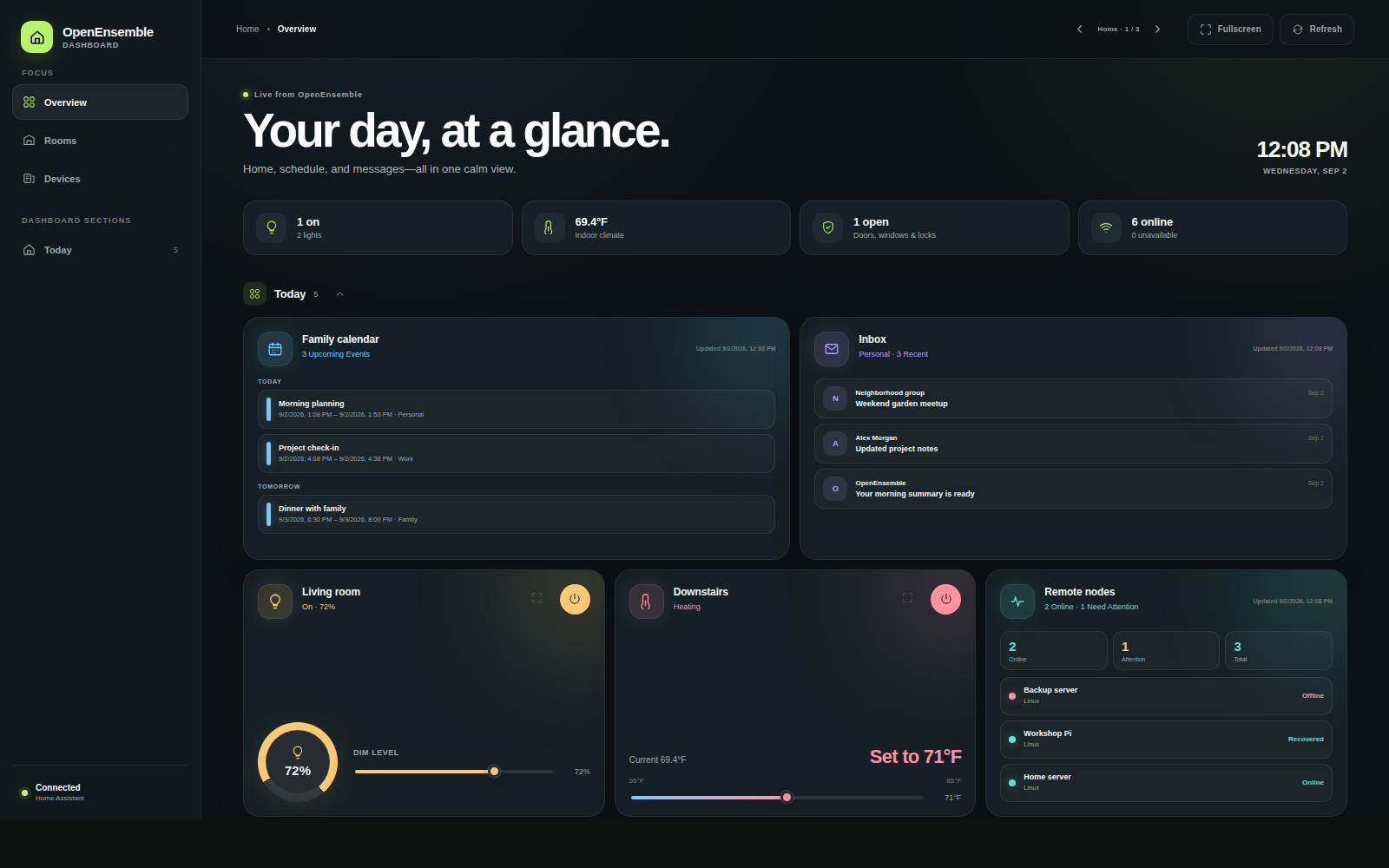
One display can combine home controls with read-only Calendar, Email, Nodes, and custom-skill status cards.
One studio, as many views as you need
Open Dashboard from the main Chat/Dashboard/Workspace switcher or the left menu, then choose Display dashboards. Both entries lead to the same studio, where you can create, configure, open, duplicate, or delete displays.
A profile can keep up to 32 dashboards. The required Home dashboard is created automatically; additional dashboards can serve a kitchen tablet, office status screen, bedside view, family calendar, or any other browser.
When creating one, choose a name, description, permanent address slug, and one of two base themes. Start with:
- Blank for an empty section;
- Starter home for a layout built from readable Home Assistant entities;
- Copy existing to reuse a complete layout as an independent new display.
The slug stays fixed when the dashboard is renamed, so bookmarks and mounted tablets keep working.
Make every part yours
The editor is built into OE. Sections and cards can be added, renamed, reordered, restyled, resized, or removed. Home Assistant entities can appear as individual cards or as groups. The canvas can even have no sections at all.
Every dashboard controls its own frame. You can independently show or hide:
- the sidebar, top toolbar, and OpenEnsemble branding;
- Overview, Rooms, and Devices navigation and section shortcuts;
- connection and live-source status;
- an automatic greeting, an exact custom greeting, or no greeting;
- the tagline, clock, summary, and section headings.
Its saved palette can override the background, surfaces, cards, primary and muted text, accent, greeting, and tagline. Leaving any value blank inherits it from Midnight or Warm daylight, and the editor provides a preview and contrast guidance.
Cards from your home and your tools
| Source | Dashboard experience |
|---|---|
| Home Assistant | Live entity state, cameras, weather, grouped devices, and OE’s supported controls |
| Calendar | A read-only agenda for today or the next 3, 7, or 14 days |
| A read-only recent-inbox card with account, message-count, and snippet choices | |
| Nodes | Read-only availability and health for remote machines paired to the active profile |
| Custom skills | Safe summary, metric, and list widgets declared by a user-scoped skill |
Calendar, Email, and Nodes use the active profile’s connected services and permissions. Each widget refreshes independently, so one unavailable source does not blank the rest of the display. The Nodes card reports status only—it never runs commands or changes a node.
Custom skills cannot inject HTML or JavaScript. They declare a widget bound to an exact read-only, non-destructive data tool; OE validates the result and owns the rendering. Unattended custom-widget reads run with a read-only filesystem and no native network access. This keeps a useful at-a-glance card from quietly becoming an arbitrary background program.
Swipe through a dashboard set
With more than one dashboard, a standalone display can cycle through the profile’s saved order:
- swipe left for the next dashboard;
- swipe right for the previous dashboard;
- continue past either end to wrap around.
The top toolbar also provides Previous and Next buttons with the current name and position. If the toolbar is hidden, touch swiping still works. Swipes that start on controls, sliders, menus, dialogs, or horizontal scrollers are ignored, and gestures never switch dashboards in Configure mode.
Changing dashboards opens the destination at its configured default focus instead of carrying over an unrelated room or section. An explicit ?fullscreen=1 setting is preserved. Individual addresses remain available, so a browser can always open one dashboard directly even though swiping is ready when it is useful.
Designed for signed-in displays
A dashboard address is not an anonymous share link or a limited kiosk token. The browser signs in to the OE profile that owns the dashboard, and its layout and live data require that normal session. The same slug may exist in several profiles; the active profile determines which dashboard appears.
That browser holds the profile’s full OE session, not a dashboard-only session. Someone who can use an unlocked tablet can navigate to other OE features that the account is allowed to open. For a shared or unattended screen, use a dedicated least-privilege profile, limit its features and providers, configure an appropriate access schedule, prefer private HTTPS access, and use the device or browser’s screen/kiosk lock.
Browser sessions have a fixed seven-day maximum and may also have a shorter administrator-configured idle timeout. A long-running tablet will eventually need to sign in again, and its session can be revoked at any time from Settings → Profile → Active Sessions.
Home Assistant access is profile-wide rather than scoped to a particular dashboard or hidden card. Owners and admins receive runtime access; regular profiles need the Home Assistant role enabled. The configured Home Assistant token can apply additional upstream limits. Calendar, Email, Nodes, and custom-widget permissions are rechecked on refresh. Revoked data is cleared on the next refresh; a transient provider failure can leave the previous result visible and marked stale.
Keep direct addresses too
The dashboard library can copy any display address for a bookmark or tablet. Deleting a non-Home dashboard permanently removes its saved layout; duplicate it first if you may need a copy. Home cannot be deleted, but Customize → Dashboard settings → Reset everything rebuilds it when you want to start over.